
Vincent Bernat: CSS & vertical rhythm for text, images, and tables
Vertical rhythm aligns lines to a consistent spacing cadence down the page. It
creates a predictable flow for the eye to follow. Thanks to the rlh CSS unit,
vertical rhythm is now easier to implement for text.1 But illustrations
and tables can disrupt the layout. The amateur typographer in me wants to follow
Bringhurst’s wisdom:
Headings, subheads, block quotations, footnotes, illustrations, captions and
other intrusions into the text create syncopations and variations against the
base rhythm of regularly leaded lines. These variations can and should add
life to the page, but the main text should also return after each variation
precisely on beat and in phase.― Robert Bringhurst, The Elements of Typographic Style
Text
Three factors govern vertical rhythm: font size, line height and
margin or padding. Let’s set our baseline with an 18-pixel font and a 1.5
line height:
html {
  font-size: 112.5%;
  line-height: 1.5;
}
h1, h2, h3, h4 {
  font-size: 100%;
}
html, body,
h1, h2, h3, h4,
p, blockquote,
dl, dt, dd, ol, ul, li {
  margin: 0;
  padding: 0;
}
CSS Values and Units Module Level 4 defines the rlh unit, equal to the
computed line height of the root element. All browsers support it since
2023.2 Use it to insert vertical spaces or to fix the line height
when altering font size:3
h1, h2, h3, h4 {
  margin-top: 2rlh;
  margin-bottom: 1rlh;
}
h1 {
  font-size: 2.4rem;
  line-height: 2rlh;
}
h2 {
  font-size: 1.5rem;
  line-height: 1rlh;
}
h3 {
  font-size: 1.2rem;
  line-height: 1rlh;
}
p, blockquote, pre {
  margin-top: 1rlh;
}
aside {
  font-size: 0.875rem;
  line-height: 1rlh;
}
We can check the result by overlaying a grid4 on the content:
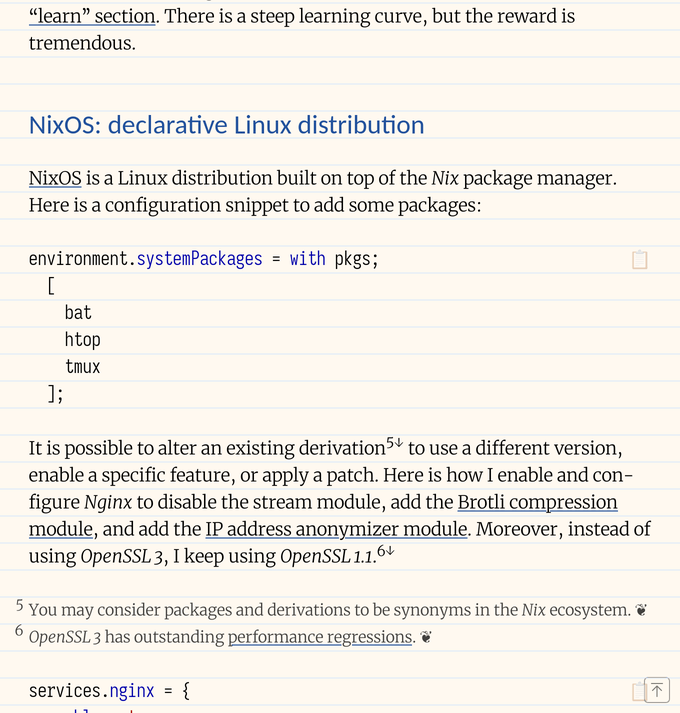
Using CSS rlh unit to set vertical space works well for text. You can display the grid using Ctrl+Shift+G.
If a child element uses a font with taller intrinsic metrics, it may stretch
the line’s box beyond the configured line height.5 A workaround
is to reduce the line height to 1. The glyphs overflow but don’t push the line
taller.
code, kbd {
  line-height: 1;
}
Responsive images
Responsive images are difficult to align on the grid because we don’t know their
height. CSS Rhythmic Sizing Module Level 1 introduces the block-step
property to adjust the height of an element to a multiple of a step unit. But
most browsers don’t support it yet.
With JavaScript, we can add padding around the image so it does not disturb
the vertical rhythm:
const targets = document.querySelectorAll(".lf-media-outer");
const adjust = (el, height) => {
  const rlh = parseFloat(getComputedStyle(document.documentElement).lineHeight);
  const padding = Math.ceil(height / rlh) * rlh - height;
  el.style.padding = `${padding / 2}px 0`;
};

targets.forEach((el) => adjust(el, el.clientHeight));
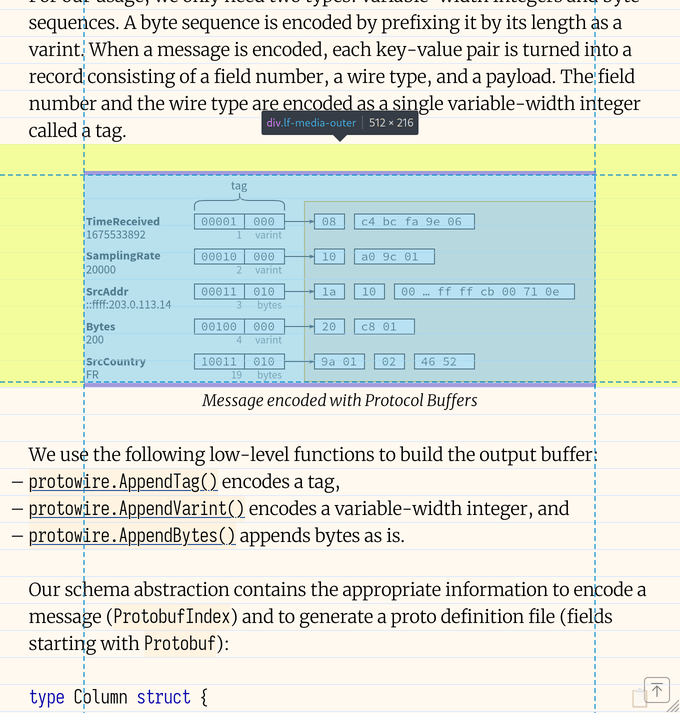
The image is snapped to the grid thanks to the additional padding computed with JavaScript. 216 is divisible by 27, our line height in this example.
As the image is responsive, its height can change. We need to wrap a resize
observer around the adjust() function:
const ro = new ResizeObserver((entries) => {
  for (const entry of entries) {
    const height = entry.contentBoxSize[0].blockSize;
    adjust(entry.target, height);
  }
});
for (const target of targets) {
  ro.observe(target);
}
Tables
Table cells could set 1rlh as their height but they would feel constricted.
Using 2rlh wastes too much space. Instead, we use incremental leading: we
align one in every five lines.
table {
  border-spacing: 2px 0;
  border-collapse: separate;
  th {
    padding: 0.4rlh 1em;
  }
  td {
    padding: 0.2rlh 0.5em;
  }
}
To align the elements after the table, we need to add some padding. We can
either reuse the JavaScript code from images or use a few lines of CSS that
count the regular rows and compute the missing vertical padding:
table:has(tbody tr:nth-child(5n):last-child)   { padding-bottom: 0.2rlh; }
table:has(tbody tr:nth-child(5n+1):last-child) { padding-bottom: 0.8rlh; }
table:has(tbody tr:nth-child(5n+2):last-child) { padding-bottom: 0.4rlh; }
table:has(tbody tr:nth-child(5n+3):last-child) { padding-bottom: 0 }
table:has(tbody tr:nth-child(5n+4):last-child) { padding-bottom: 0.6rlh; }
A header cell has twice the padding of a regular cell. With two regular rows,
the total padding is 2×2×0.2+2×0.4=1.6. We need to add 0.4rlh to reach
2rlh of extra vertical padding across the table.
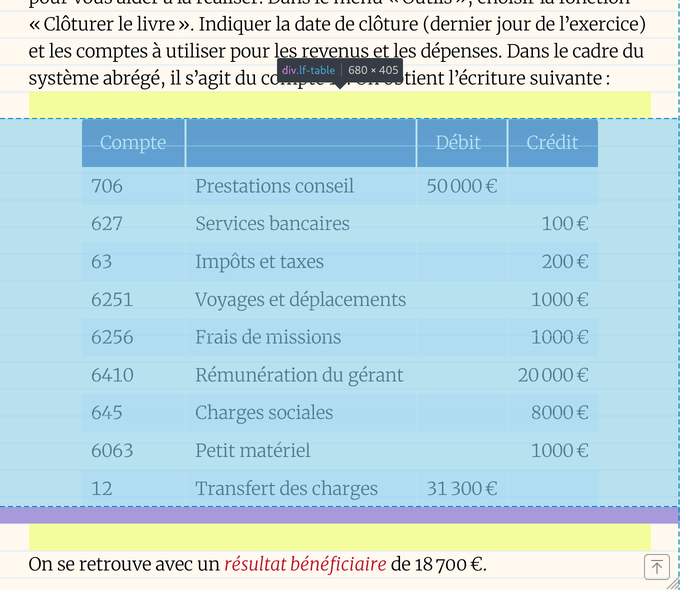
One line out of five is aligned to the grid. Additional padding is added after the table to not break the vertical rhythm. 405 is divisible by 27, our line height in this example.
None of this is necessary. But once you start looking, you can’t unsee it. Until
browsers implement CSS Rhythmic Sizing, a
bit of CSS wizardry and a touch of JavaScript is enough to pull it off. The main
text now returns after each intrusion “precisely on beat and in phase.” 🎼
-
See “Vertical rhythm using CSS
lhandrlhunits” by Paweł
Grzybek. ❦ -
For broader compatibility, you can replace
2rlhwith
calc(var(--line-height) * 2rem)and set the--line-heightcustom
property in the:rootpseudo-class. I wrote a simple PostCSS
plugin for this purpose. ❦ -
It would have been nicer to compute the line height with
calc(round(up, calc(2.4rem / 1rlh), 0) * 1rlh). Unfortunately, typed
arithmetic is not supported by Firefox yet. Moreover, browsers support
round()only since 2024. Instead, I coded a PostCSS
plugin for this as well. ❦ -
The following CSS code defines a grid tracking the line height:
body::after {
  content: "";
  z-index: 9999;
  background: linear-gradient(180deg, #c8e1ff99 1px, transparent 1px);
  background-size: 20px 1rlh;
  pointer-events: none;
}
-
See “Deep dive CSS: font metrics, line-height and vertical-align” by Vincent De Oliveira. ❦


